

Your OPNsense router assembled by Rack Matrix Technology is supplied with the following configuration.
LAN depending on the model.
The LAN port is the one with interface number 0. Depending on the model, the LAN port interface identifier may be igb0, em0, or re0.
The default IP address for the LAN port is 192.168.1.1/24.
WAN depending on the model.
The WAN port is the one with network interface number 1(e.g., igb1, em1, or re1, depending on the model).
The WAN port is configured for DHCP by default.
For example, if the WAN interface is igb1, the LAN interface is igb0.
Serial console port depending on the model.
The serial console port comes in one of two formats, depending on the model you have:
- The first uses a male DB9 connector (found on PC Engines APU boards, which reached end-of-life in 2023).
- The second uses a female RJ45 connector ("Cisco-style").
The default settings are the same regardless of the serial port type:
- Speed: 115200 baud
- Bits: 8 bits
- Stop bits : 1
- Parity: None
- Flow control : None
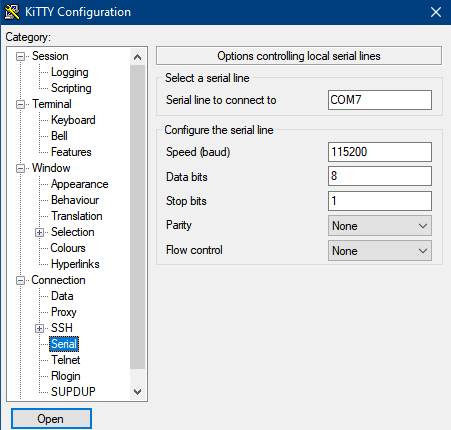
You have two options for controlling your router
1 - Using the serial port
If the default settings do not suit your needs, use a serial terminal program (such as PuTTY or KiTTY)
to connect to the router. Configure your terminal using the serial connection settings listed above. Once the system boots, you will have access to a text-based menu containing all available operations.
Default serial authentication settings:
Username: root
Password: opnsense
2 - Using the Web interface
By default, configuration can only be performed via the LAN port.
(If you wish to access the configuration via the WAN port, you must configure it in the web interface in advanced option.)
Connect the computer used to configure your router to the LAN port. Ensure it is set to DHCP client mode to automatically obtain an IP address.
Web access to OPNsense via the LAN port:
https://192.168.1.1
Default web authentication settings:
Username: root
Password: opnsense
OPNsense is open-source software where the source code can be downloaded from github.com/opnsense
OPNsense® is Copyright © 2014-2026 by Deciso B.V.
OPNsense® is licensed under an Open Source Initiative approved license.