

Configuring Quectel EC25-EUX 4G LTE modems in OPNsense
Introduction
We now ship our OPNsense routers with Quectel EC25-EUX 4G LTE modems. The Huawei modems we used before have become rare and very expensive because of the US sanctions against Huawei.
This article shows how to configure a Quectel EC25-EUX modem in OPNsense, and what changes compared with the Huawei ME909s-120 modem you may already know.
What changes compared with the Huawei ME909s-120
The configuration is the same, except for two details.
1. The serial port of the modem
/dev/cuaUx.3for the Quectel EC25-EUX and the SIMCom SIM7600G-H;/dev/cuaUx.0for the Huawei ME909s-120.
x is the number of the modem. With a single modem in the router, which is the most common case, x is 0: the port of the EC25-EUX is then /dev/cuaU0.3.
2. The initialisation string (Init String)
| Modem | Init String |
|---|---|
| Quectel EC25-EUX | empty, or &F (both work) |
| SIMCom SIM7600G-H | empty |
| Huawei ME909s-120 v2 | &F |
Configuration in OPNsense
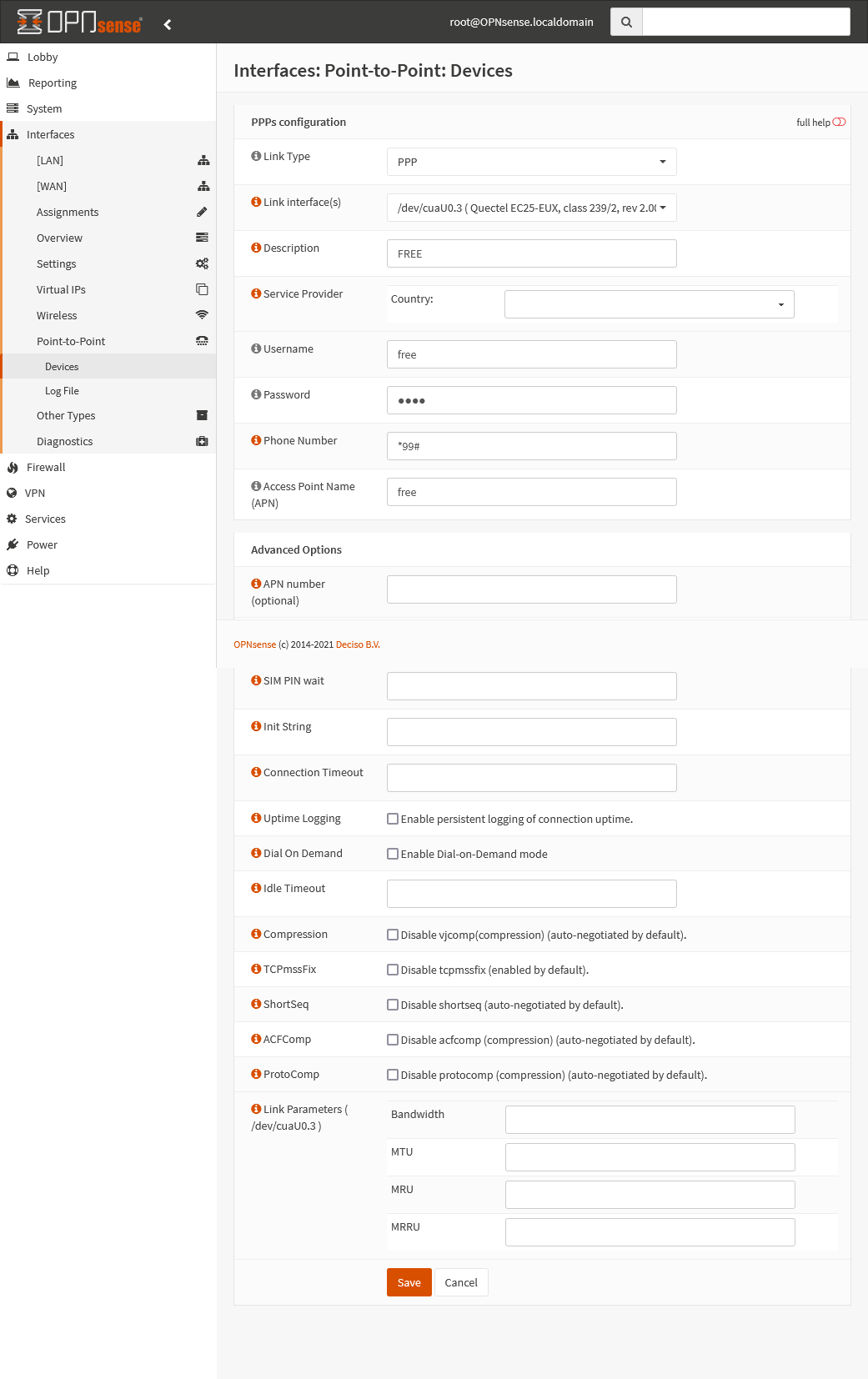
In the OPNsense web interface, open Interfaces > Point-to-Point > Devices and add a device:
- Link Type:
PPP; - Link interface(s):
/dev/cuaU0.3, listed as "Quectel EC25-EUX"; - Description: any name, for example the name of the carrier;
- Username, Password and Access Point Name (APN): the values given by your carrier (the example below uses the French carrier Free);
- Phone Number:
*99#; - Init String (in the advanced options): leave it empty.
Save, then assign this device to an interface in Interfaces > Assignments.
Here is the complete configuration of a Quectel EC25-EUX modem in OPNsense (click to enlarge):
The 4G link drops after a few seconds?
A user reported a backup 4G link that worked for about ten seconds, then dropped and could not come back up. His OPNsense was running in a Proxmox virtual machine on the appliance.
We have not seen any problem with the Quectel EC25-EUX when OPNsense is installed directly on the hardware. If OPNsense or pfSense runs in a virtual machine, first test the modem by booting OPNsense in live mode (VGA or serial images): you will then know whether the problem comes from the modem or from the virtualisation.